



What happens when you give a designer who can’t write Python the equivalent of a hand cannon in the form of an AI coding assistant, a stack of credits, and limited time to burn through them?

TL;DR: I tested the Claude Code for Web research preview. The interface was rough at first. Buttons didn’t work, sessions crashed. I had several projects to test it with: a simple email manager, a CrewAI project, and a Jupyter notebook that ChatGPT-5 couldn’t finish. Anthropic kept improving it in real time. It’s far from reliable, but the improvements in a week have been impressive.
A week or two ago, Anthropic began rolling out access to the research preview of Claude Code for Web, a browser-based AI coding assistant. It came with a stack of credits to experiment with and a couple of weeks to use them. I figured I’d burn through them like a Vegas weekend. Not only was I wrong, getting through half was a challenge.
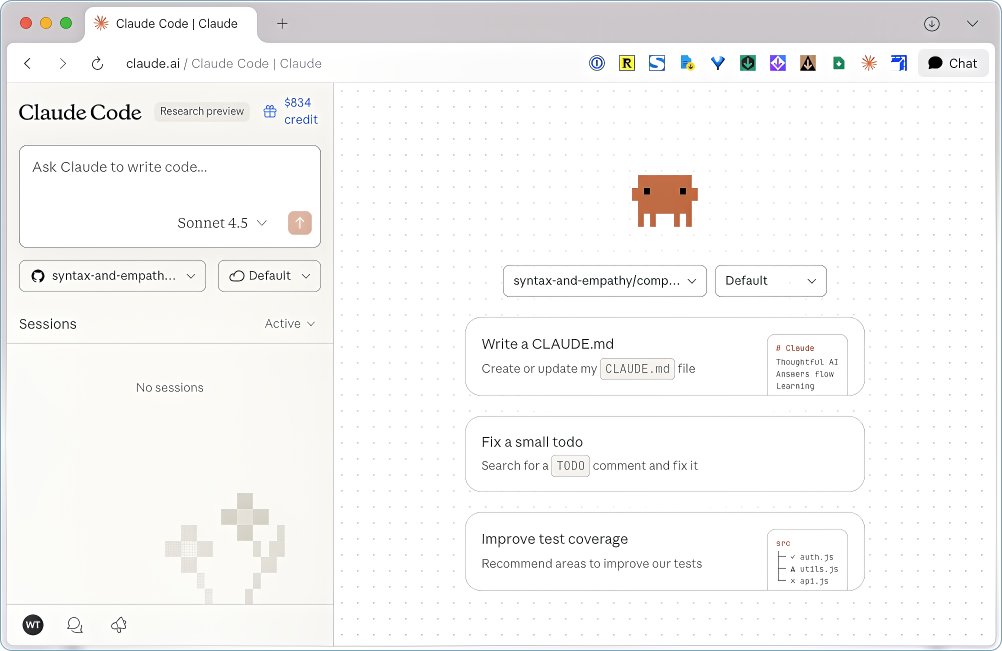
When the email arrived offering access to the web preview, I was ready to test it against projects that hadn’t worked out for one reason or another. I’ve been in teams that shipped services to production with preview or beta labels slapped on them, so I knew to expect rough edges, if not worse.

A Tale of Two Chat Boxes
The web interface took some figuring out. The screen was split in half with a chat box at the top of the left panel and another at the bottom of the right. I typed in the first box and started a session, didn’t know what was going on, tried replying in that box and started a second session. After that it was clear I’d need to switch over to the other one.
Every Claude interface I’ve used had a single chat input. You do the thing and you keep going. I’m curious why Anthropic chose to deviate from the pattern, a question I expect to go unanswered.

You could connect to GitHub but couldn’t create a pull request. You could select repositories but not branches. No file upload to share screenshots or files—the kind of basic workflow actions that keep you moving without breaking stride. Instead, everything required workarounds: cut and paste, or dropping into the IDE to push files to the repository.
Email Manager
I started with a small task that had clear boundaries. I wanted to reverse-engineer a tool I’d built through the IDE that created local copies of emails based on sender and keywords—to look for a label so I could tag others that I wanted copies of but didn’t meet any criteria.
I’ve used the IDE version on several projects, and I’ve had to learn more than a few Git commands to avoid giving Claude total control and being at risk of losing everything. The web version took care of it all automatically, no terminal needed.
It’s the experience you want, and want to ship. It just worked.
It was finished in less than fifteen minutes. No manual git commands, no copying between windows, no instructions beyond the initial prompt. It operated without friction and delivered clean results.
Cost: 11 Credits.
CrewAI Flow
I moved on to something larger: a CrewAI workflow with 8 phases and distinct agent handoffs. Claude took on entire phases rather than breaking work into incremental units. It would make it through the entire task list, then choke on trying to perform the commit.

I tried working on something else in a different session and coming back, refreshing the page, and even letting it sit overnight. I couldn’t get them to start back up, and it’s fair to say it wasn’t uncommon on tasks of this size. After three or four occurrences, I decided to move on to something else.
Cost: Unknown.
I didn’t file a bug, provide feedback, or contact support, but credits magically reappeared in my account, customer service at its best.
Jupyter Notebook
I had this Jupyter notebook sitting there. Version 3.7, a more sophisticated release of the v1.3 notebook that I published about recently. It was 67% done. Twelve modules, 90-something cells of Python. ChatGPT-5 had gotten me through eight modules before we started hitting Colab disk errors it couldn’t figure out. I’d set it aside because I’d already lost too much time to it and feared I’d have to reconsider the approach.
But it was well-documented. I’d been saving notes after every module, the AI would give me summaries from three different roles I’d set up, and I’d dump them into the project files. I was using it to build its own knowledge base as it went.
So I pointed Claude at it.
Two Steps Backward, One Path Forward
First round, Claude ended up regressing things. It hit the same problems ChatGPT had hit earlier. I assume there’s something about Python best practices or how Colab works, given both AIs ended up trying it.
So after a day, maybe two, I went back to the September version where I’d stopped with GPT. And here’s the thing. I hadn’t given Claude any of those notes I’d been saving.
In a fresh session, I provided Claude with everything. A summary for every module documenting what had occurred. I told it the notes documented what happened and that it would face the same issues if it tried to update everything. That it should focus on going forward.
Test Cells and Frozen Sessions
It didn’t just work. There were problems. Data wasn’t getting created upstream. Claude suggested putting in test cells after every module, right before the visualizations, just to see if the data actually existed.
Then the session froze again before we could implement it. I started a new session, gave it the prior instructions and had it follow through on the plan to add the cells it had just recommended. That gave it visibility into what was broken upstream, and the debugging went pretty fast after that.
Module 10 is where we figured out data wasn’t coming downstream or wasn’t being created, as it turned out. Once that was fixed, Module 10 worked fine. Module 11 took no time, Module 12 just worked, and suddenly we were looking at a complete pipeline.

90 Cells and a Scroll Bar
This thing is long. At some point Claude said it was around 90 cells. I don’t know if it was having trouble counting , but I know I get tired just trying to scroll through it. I use scroll bar instead of my mouse. That’s how long it is.
But Claude managed to hold context for the entire thing. It would say “go back to cell zero-whatever and change this and then this will work.” We were in Module 10 when it said that. It was tracking considerable amounts of information. We’re not talking a page. We’re talking reams of Python.
It fixed ChatGPT’s mistakes, finished the pipeline, and didn’t have the same Colab disk issues that ChatGPT had. And it did it in less than 12 hours.
ChatGPT’s Notes
That’s not including the time I spent making those three roles in ChatGPT, which undoubtedly saved me time and was the source of the end-to-end roadmap for the notebook. And I had the notes from those sessions, which were a big advantage. So it’s not like ChatGPT was bombing out either.
But still, it had hit a wall, and I plan to write about that at a later date.
Development in Real Time
I’ve watched enough tool launches to know the difference between shipping something broken and shipping something in actual preview. This was the latter.
When I started, buttons didn’t work. The PR button was inactive. The CLI button did nothing. I couldn’t figure out if I could resize the window; apparently when you’re below a certain viewport it won’t let you, responsive design gone wrong no doubt.

A week later? The PR button works. Sessions that used to freeze and never recover started to recover on occasion. That “retry connection” button that just sits there doing nothing? Haven’t seen it in days.
The improvements happened in real time. This is what “research preview” actually means when companies are being honest. It’s genuine live development with users as participants, not unstable software dressed up as a launch.
And the thing that prevented it from being one disappointment after another? The constant stream of commits I found concerning at first because all those automatic commits felt chaotic. But when sessions locked up, I hadn’t lost everything. The work was already in a branch somewhere.
The Remaining Rough Edges
No copy button for code blocks. No file attach or paste for images. I can do both in the IDE and the regular Claude chat, but my workflow probably isn’t typical. Developers are working in their actual files, not pulling code snippets into other tools.
The interface still has quirks, but the core capability is strong enough that the friction is just interesting rather than blocking. I get that these aren’t priorities in preview.
$800 and 4 Days Left
I’m pretty excited to have been invited to look at this. The thought of being able to hop on a computer anywhere, pop in my credentials, and not have to worry about anything because it’s all being taken care of in GitHub, in the safety of branches in case sessions lock up.
I’m 10 credits away from dropping below $800 with 4 days left to spend them. I’ve been told roulette is the best way to lose money in a casino. Time to spin the wheel.

Did you get a chance to try Claude Code for Web? What was your best, or worst, experience with preview software? And at what point does capability outweigh the friction during development?
Tags: AI for Design Professionals, AI Code Assistant, Claude Code


William Trekell : Linkedin : Bluesky : Instagram : Feel free to stop by and say hi!
